
\
TABLE OF CONTENTS
- Introduction
- MyID method
- Phone call
Introduction
MyID method
stage 1/ Before you start - principal authority on ABR
- ABR - if unsure, check with Teresa.
- ASIC for companies
- ACNC for charities
A principal authority is a person responsible for the business, such as:
- a sole trader
- an eligible individual associatelisted on an Australian business number (ABN) in the Australian Business Register (ABR), for example
- a trustee
- a director
- a public officer
- a business partner
- an office bearer of a club or association
- a primary person(no individual associates listed in the ABR) who holds one of the following roles
- director or public officer for the corporate trustee or subsidiary company
- authorised contact of a government entity
- director or public officer of the corporate trustee or subsidiary company or the responsible person of an Australian charity or not-for-profit organisation
- executor after probate is granted of a deceased estate
- office holder of an unincorporated association.
director of corporate trustee,
The director or public officer for the corporate trustee is a primary personExternal Link and will need to contact the RAM support line to link the business in RAM. For more information see Other ways you can link your businessExternal Link.
The client will need:
- a myID Digital ID with at least a Standard identity strength
- to complete proof of identity.
We will carry out checks to confirm they are associated with the business.
Once confirmed, your client will receive an email with an authorisation code and summary of the authorisation request. They’ll need to log in to RAM to accept the request and complete the link.
stage 2/ before you start - iphone setup myid strength + business linked
- Have myID set up on your smartphone, with STRONG identity (not standard) - see more info here to install the app and get your identity verified- 3 IDs verified.
- note, you will need to ensure your smartphone is not an outdated and not unsupported. e.g. Iphone 5 won't since its an old outdated model.
- you have 3 attempts before app locks 24 hours on your app. don't push your luck
- On a computer,
- open a web browser (chrome, firefox, safari) and go to this site: RAM.
- type in your MyID email, and it will send passcode to your Smartphone through your myID app.
- Proceed to link your ABN to your myID - this will enable you to use ATO Online Services for Businesses
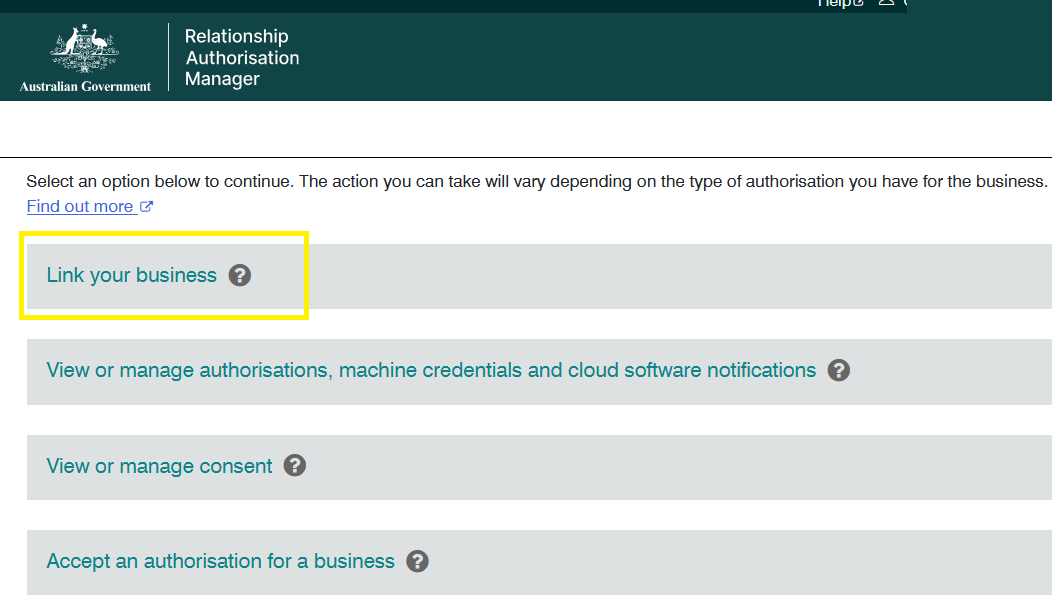
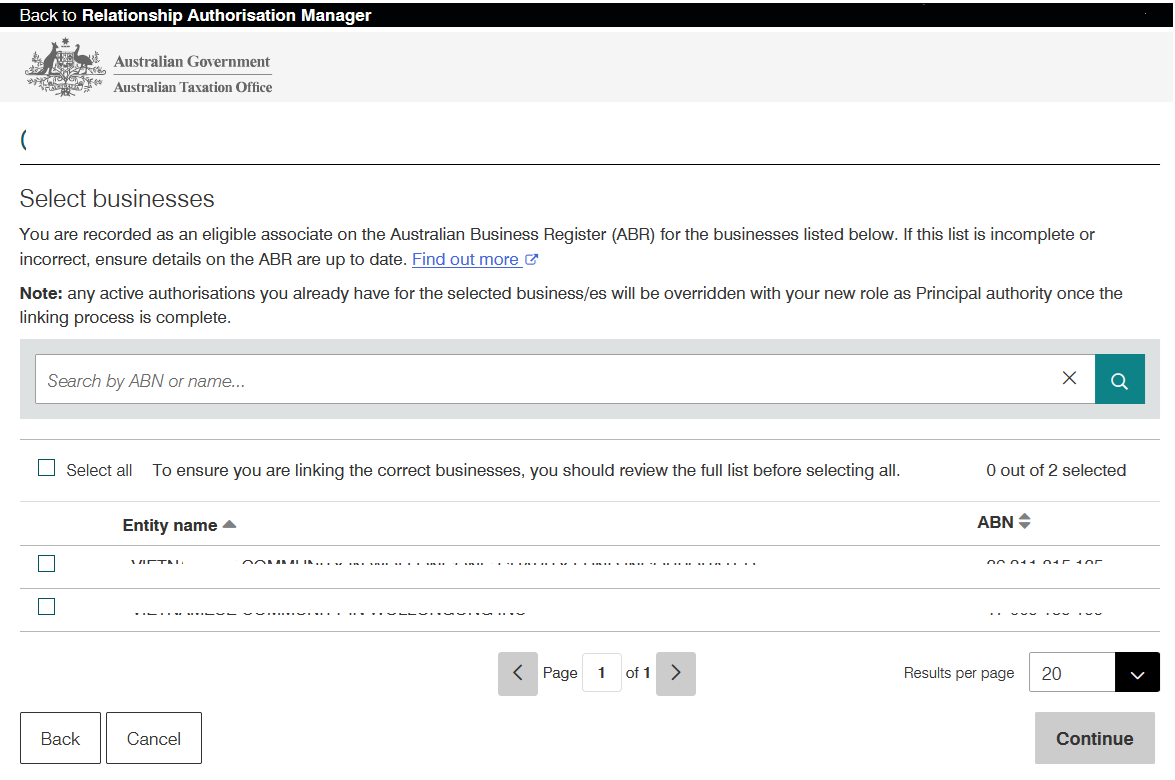
- After linking is successful, on your computer, see below
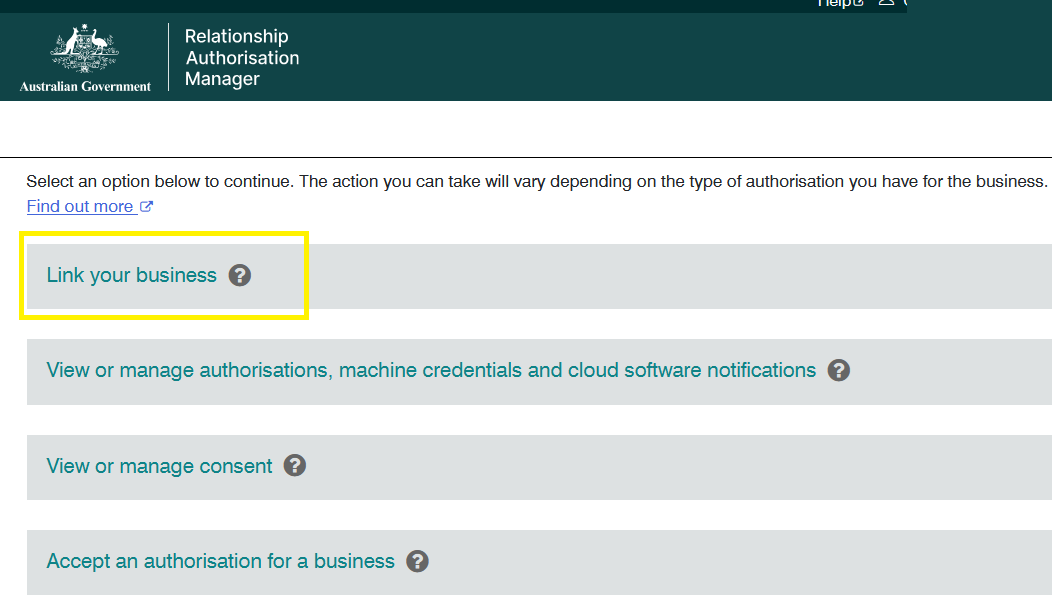
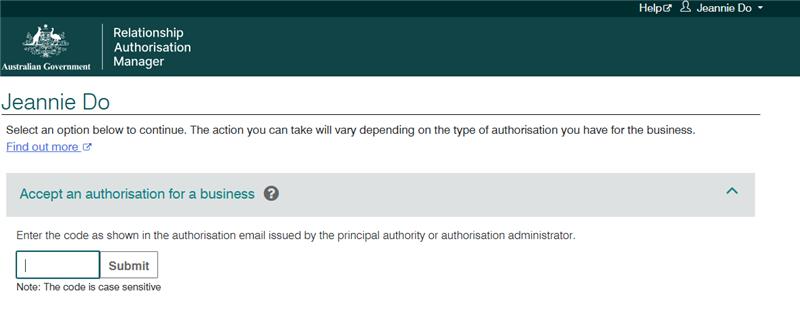
stuck on RAM page where it shows only ACCEPT AN AUTHORISATION FOR BUSINESS.
if you see something like this where its missing a bunch of options compared to the earlier image
| Good | Bad |
 |  |
ask MyID screenshot to identify errors
ask client to send screenshot of their myID app > MY IDENTITY - you will see and assess the following:
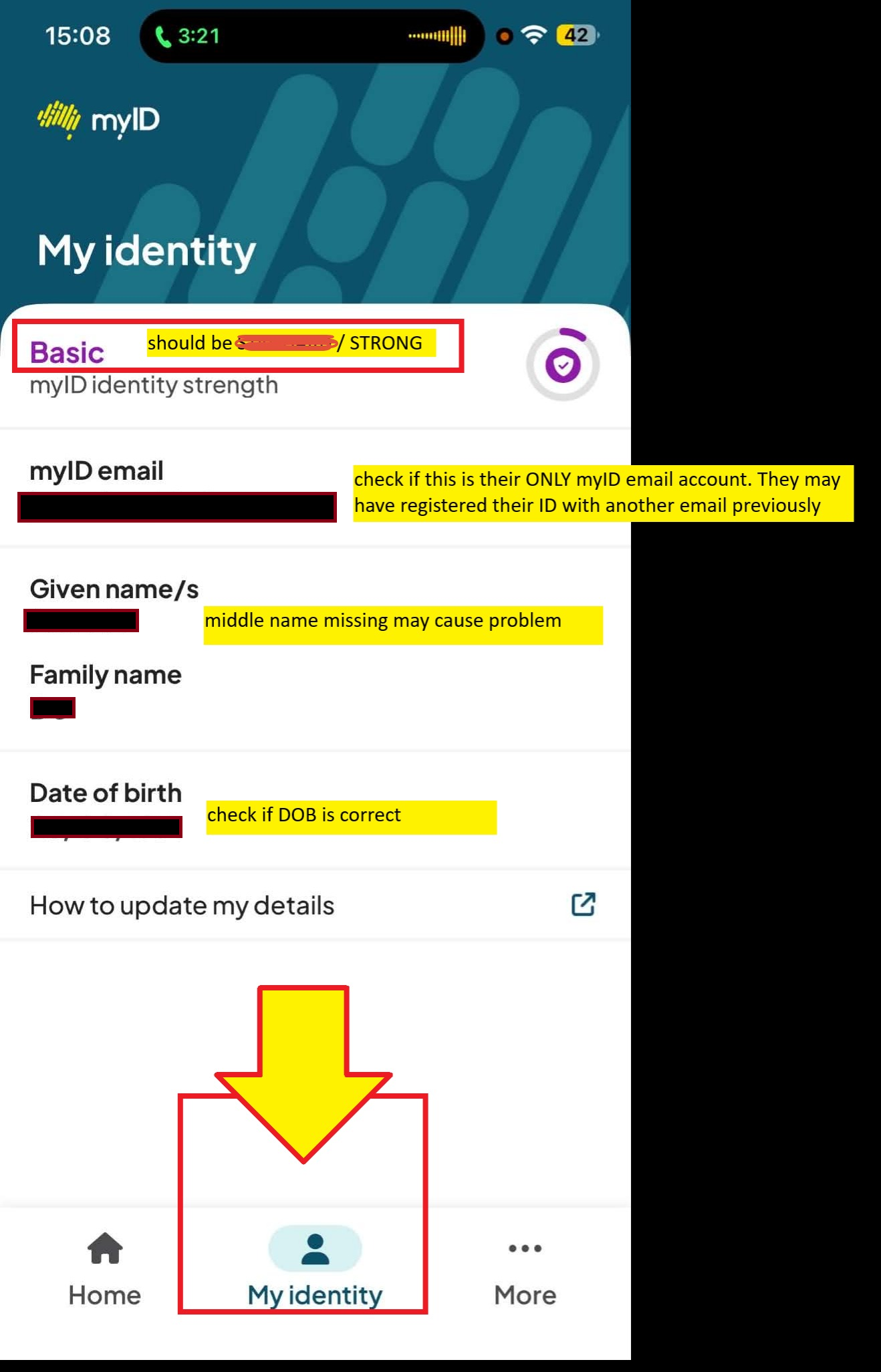
common mistake
- name & dob mismatch/error -
- see Jenny Ku for Corrimal nail
- for company client -
- check ASIC/nowinfinity to see if their name matches with myID or ATO record
- check ABR
- for trust, SMSF etc - check ABR
- and they used a previous email in the past - this was the problem of Jdofs Jeannie (image above). She had linked her driver licence and id to another image
login to their myID yourself
- ask client to send you the IDs they used to verify their identity (licence, passport, citizenship)
stage 3/ ATO online services
- click this site:
- direct page is here https://onlineservices.ato.gov.au/business/BusinessLogin.html
- if the above link doesn't work, locate it here ATO Online Services for Businesses
- log in with your myID email. It will send a passcode to your smartphone
- select Profile > Agent details
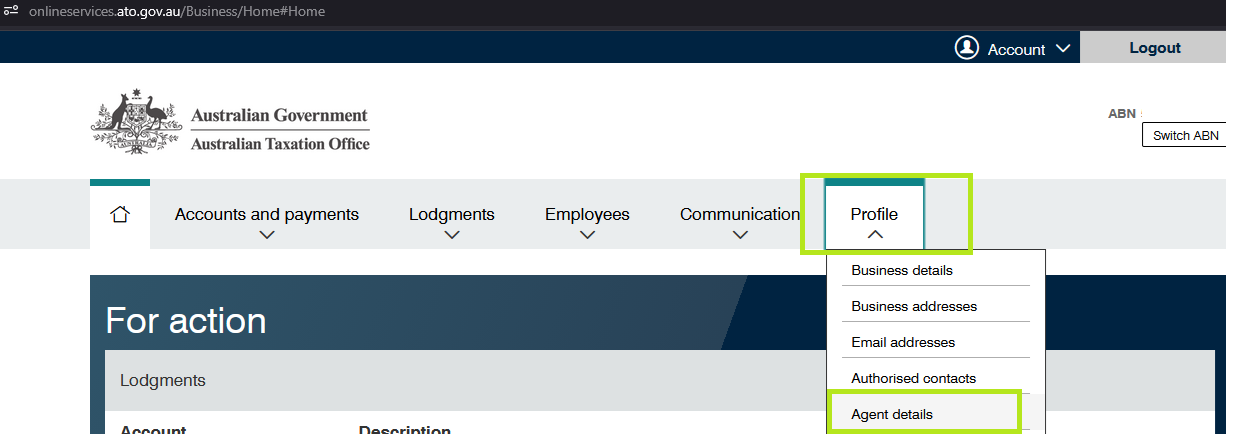
- at the Agent nominations feature, select Add
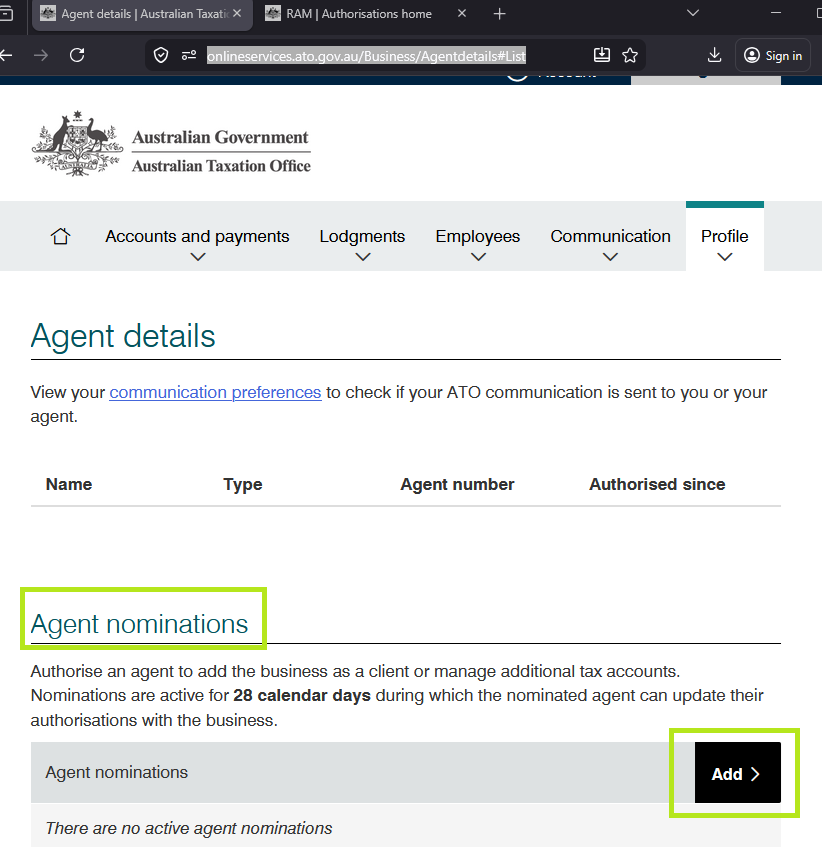
- on the Nominate agent screen,
- go to Search for agent & type our agent registered agent number: 2524 5906 and select ?︎ (Search icon)
- Select the agent: Teresa Tran & Associates
- Complete the Declaration
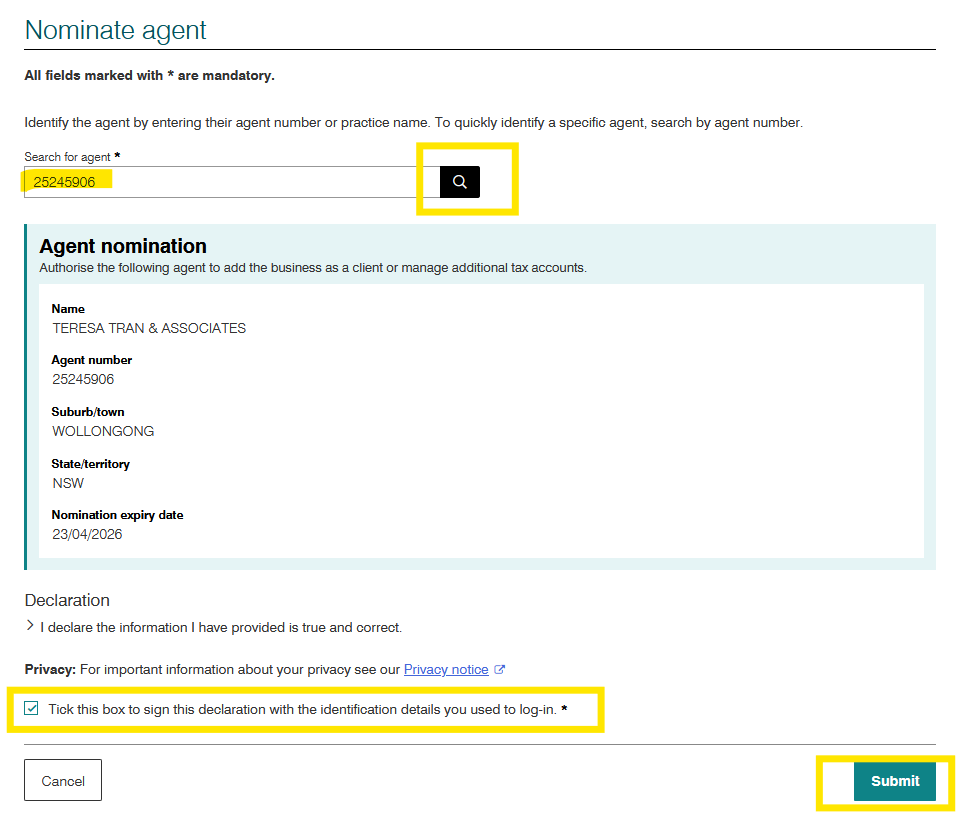
- select Submit. and it should look like this. Select Print-Friendly version and send this to us via email
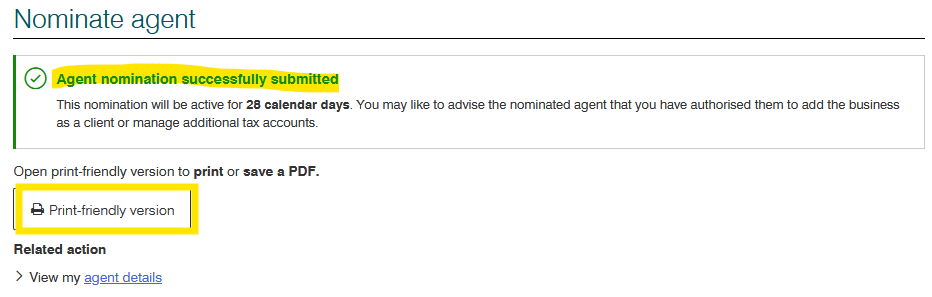
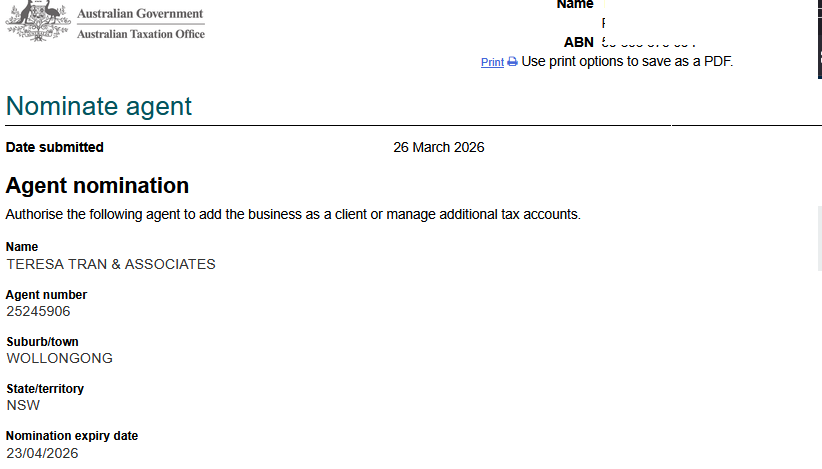
- call us or email us to inform that you've done the steps above.
Phone call
you and client together in a room
you will need:
- client with you
- client IDs (passport licence etc)
- business entity ato doc with tfn, abn, ato doc id
method (link up to 7 business)
- Phone 1300 287 539 and select option 3, then option 1 during operating hours to complete a proof of identity check.
- Checks will be completed to confirm your association to the business.
- Once confirmed, you’ll receive an email with an authorisation code and summary of the authorisation request to accept within 7 days
- log in to RAM
- accept the authorisation for a business and enter code
- Review the authorisation summary – select the checkboxes to declare you understand and accept and provide your express consent, then select Accept to complete the link
method link more than 8 businesses
Jeannie ku